> For the complete documentation index, see [llms.txt](https://glyue.docs.sandboxbanking.com/llms.txt). Markdown versions of documentation pages are available by appending `.md` to page URLs; this page is available as [Markdown](https://glyue.docs.sandboxbanking.com/etl/workflows/transform.md).
# Transform
The Transform node is one of the most important nodes, allowing modification and/or remapping of source data before uploading it to some destination.
## Anatomy
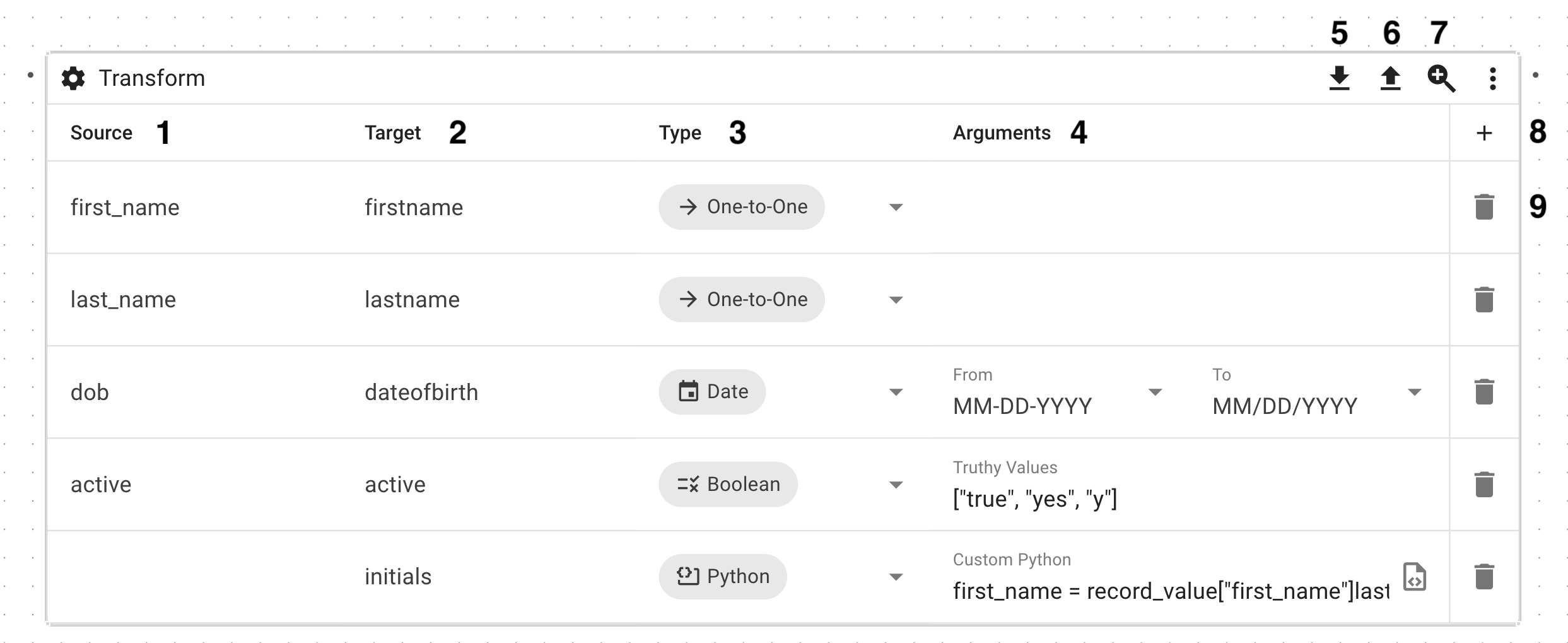
1. The name of a column from the source data.
2. The name of a column in the destination data.
3. The type of transformation to perform.
4. The arguments for a given transformation type.
1. These aren't always required (e.g., one-to-one transformations).
5. Button to import mappings from a JSON file.
6. Button to export mappings as a JSON file.
7. Button that zooms and focuses the view on the node.
8. Button to add a new mapping.
9. Button to delete an existing mapping.
## Transformation Types
### One-to-One
The one-to-one transformation is very simple: the value of the source column is left untouched and merely mapped to the target column. No arguments are required.
### Boolean
The boolean transformation normalizes the value of the source column into either `true` or `false` based on the list of defined "Truthy Values", which are formatted as a JSON list.
For example, if the Truthy Values are defined as `["yes", "true"]` and the source column has the value `no`, the target column will have a value of `false`. Alternatively, if the source column has a value of `yes` or `true`, the target column will have a value of `true`.
{% hint style="info" %}
While the Truthy Values are case sensitive, the source column value is always compared in lowercase.
{% endhint %}
### Date
The date transformation converts a date from one format to another. It takes two arguments: the "From" date format and the "To" date format. There's a predefined list of common date formats available or, if those don't fit your requirements, you can define any date format using [Python's `strftime()` and `strptime()` format codes](https://docs.python.org/3/library/datetime.html#strftime-and-strptime-format-codes).
For example, if I have the date `2026-01-01` and I want to convert it to the format `MM-DD-YY`, I'd select `YYYY-MM-DD` from the list of predefined date formats for the "From" argument, and I'd input `%m-%d-%y` for the "To" argument.
### Python
{% hint style="info" %}
The source column is unused when using the Python transformation.
{% endhint %}
The Python transformation executes custom Python code on an entire row, with the final value being written to the target column. There are two special variables available in scope: `record_value` and `retvalue`. To access the row, you use the `record_value` variable, which is a dictionary whose keys are the column names (e.g., `record_value["column_1"]`). To pass a value to the target column, you set `retvalue` to that value.
As an example:
```python
count = int(record_value["count"])
product_name = record_value["product_name"]
if count > 1:
retvalue = product_name + "s"
else:
retvalue = product_name
```
Also, there's a restricted list of modules that can be imported. The following are currently available:
* `collections`
* `datetime`
* `functools`
* `hashlib`
* `itertools`
* `json`
* `math`
* `operator`
* `random`
* `re`
* `string`
* `time`
### Value Mapping
The Value Mapping transformation, which takes a Value Mapping Set as it's only argument, attempts to match the source column value against a list Value Mapping "From" values and assigns the target column the associated "To" value, if there's a match. If there's no match, and no default value is set on the Value Mapping Set, the transformation will fail.
For more information on Value Mappings and Value Mapping Sets, check out [the associated documentation](/etl/value-mappings.md).
---
# Agent Instructions
This documentation is published with GitBook. GitBook is the documentation platform designed so that both humans and AI agents can read, navigate, and reason over technical content effectively. Learn more at gitbook.com.
## Querying This Documentation
If you need additional information that is not directly available in this page, you can query the documentation by asking a question.
Perform an HTTP GET request on the following URL with the `ask` and `goal` query parameters:
```
GET https://glyue.docs.sandboxbanking.com/etl/workflows/transform.md?ask=&goal=
```
`ask` is the immediate question: it should be specific, self-contained, and written in natural language.
`goal` is what the user is ultimately trying to achieve, the reason they need the answer. Sharing it helps GitBook give you a better, more relevant answer. A goal is most helpful when it describes the outcome the user wants rather than restating the question. For example, with `ask=how do I create an API token`, a goal like `automate deployments from our CI pipeline` lets GitBook tailor the answer to that use case.
The response will contain a direct answer to the question and relevant excerpts and sources from the documentation.
Use this mechanism when the answer is not explicitly present in the current page, you need clarification or additional context, or you want to retrieve related documentation sections.